Product reference · Updated May 2026
AI consensus tool — six AI models that debate until they agree
An AI consensus tool builds consensus between AI models: it runs several models on the same question, lets them debate each other across rounds, and outputs a structured agreement (or honest disagreement) with per-model attribution. (Looking for software that helps a human team agree in meetings? That's a different category — here, the panel members are AI models.) This page covers what the category does, what separates a real consensus tool from a glorified parallel-chat, and how Nodalist's implementation works. Free tier available.
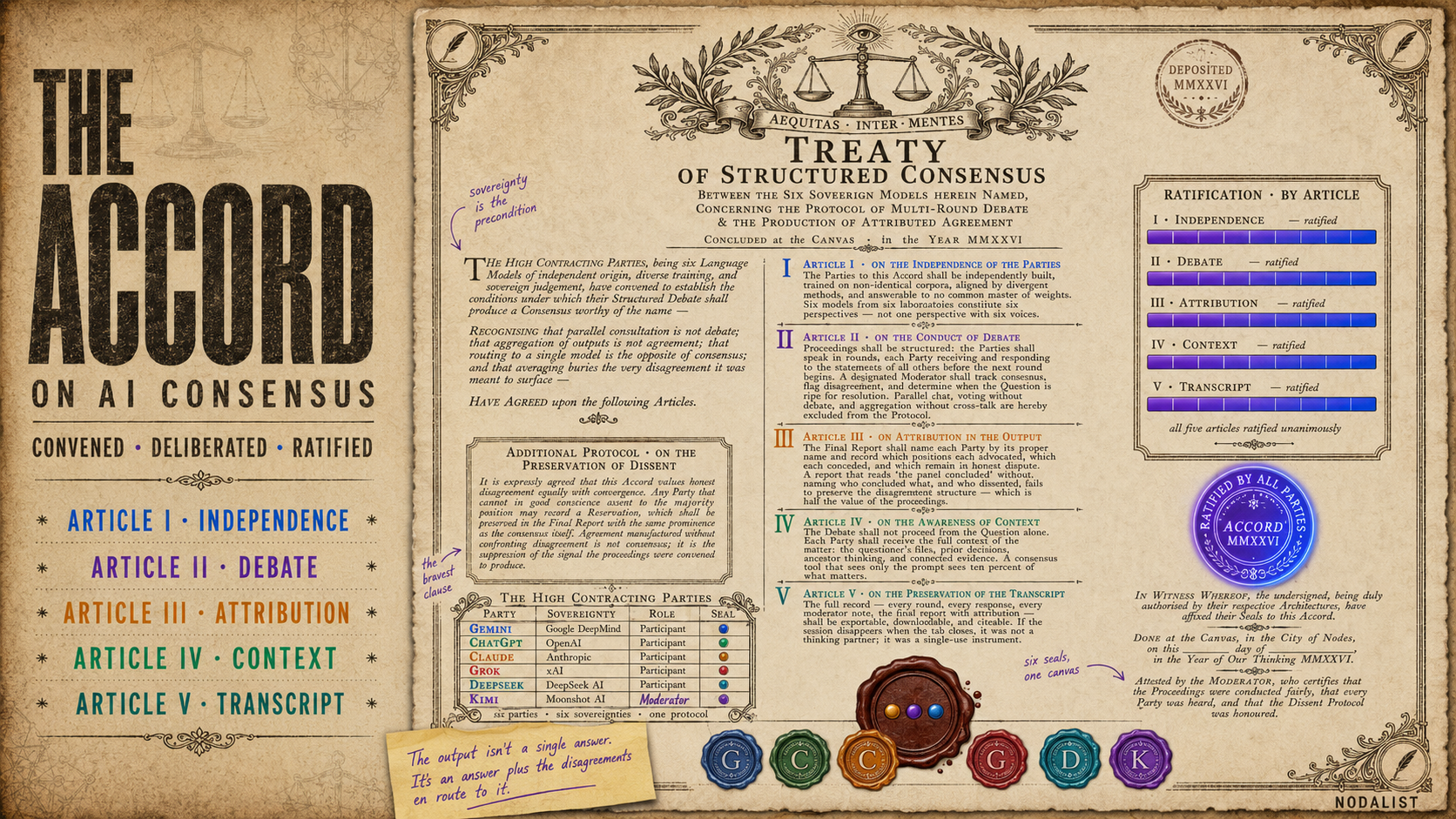
What an AI consensus tool actually does
The category is straightforward to describe and surprisingly easy to get wrong. A real AI consensus tool has three parts: multiple AI models, a structured way for them to interact, and a convergence step that produces an explicit output capturing what they agreed and disagreed on. Drop any of the three and you have something different — and usually less useful.
The interesting work happens in the middle step — the interaction. Putting six AIs on the same prompt in parallel windows isn't consensus; it's parallel chat. Running a router that picks the single best model per query isn't consensus either; it's the opposite. Averaging answers across models isn't consensus; it's ensemble voting, and it buries disagreement under the mean. Multi-LLM debate — where each model sees the previous round's responses, can rebut or refine, and is forced to defend or revise its position — is what makes this category work. Anything less, and you're back to one-AI-at-a-time with extra steps.
The output isn't a single answer. It's an answer plus the disagreements en route to it, the points each model conceded, and the questions the panel collectively couldn't resolve. That's the signal you wanted when you reached for a consensus tool in the first place — a second opinion from a panel of models: not just "what's the right answer" but "what's contested, and why."
What to look for in an AI consensus tool
Five criteria separate a serious consensus tool from a marketing one. None of them are exotic; all of them are skippable if a vendor wants to ship faster. Worth checking before committing.
1. Multiple independently-built models
Six models from six labs is structurally different from six instances of the same model with different prompts. Independent training data, different alignment regimes, different post-training methods — that's where the diversity of blind spots comes from. If a tool advertises "5+ AI models" but they're all from the same provider, you're getting one perspective with five voices, not five perspectives.
2. Structured debate, not aggregation
Look for rounds. Look for "model B sees model A's response before answering." Look for a moderator (human or AI) that can summarize, identify disagreement, and check for convergence. If the tool runs N models in parallel and concatenates their answers — that's parallel chat. If it averages outputs — that's voting. Both are useful for some things; neither is debate.
3. Per-model attribution in the output
When the panel converges, you want to know who said what. A consensus report that reads "the panel concluded X" is less useful than one that says "Claude and Kimi argued X; Grok dissented citing Y; the moderator noted the disagreement was about base rates, not values." Attribution preserves the disagreement structure, which is half the value of running a multi-AI session in the first place.
4. Context-awareness — not just the prompt
The hardest questions you'd reach for a consensus tool on aren't single-sentence prompts. They're questions that depend on files you've read, decisions you've already made, constraints you've already accepted. A consensus tool that only sees the box you typed in is missing 90% of what matters. The tool should be able to read your files, follow the thread of your earlier thinking, and weigh the question in that context — not as an isolated prompt floating in a vacuum.
5. Exportable, attributable transcript
If the session disappears when you close the tab, the consensus tool isn't a thinking partner; it's a single-use slot machine. You want a full transcript: the question, every round, every per-model response, the consensus report, the moderator's notes. Downloadable, citeable, shareable. That artifact is what makes the consensus reviewable a week later, by someone who wasn't in the session.
How Nodalist's AI consensus tool works
Nodalist's AI consensus tool is called AI Storming. The protocol is the standard one — multi-round structured debate with a designated moderator, ending in a per-model-attributed report. What's different is where it lives.
AI Storming is built into Nodalist's visual reasoning workspace. You don't launch a debate by pasting a prompt into an empty box — you launch it from a node on your canvas, and the debate inherits everything that node is connected to: the question on the node itself, the ancestor branch of decisions and notes you've already worked through, the files you've connected (PDFs, documents, images via OCR), any prior AI outputs upstream in the chain. The debate runs informed.
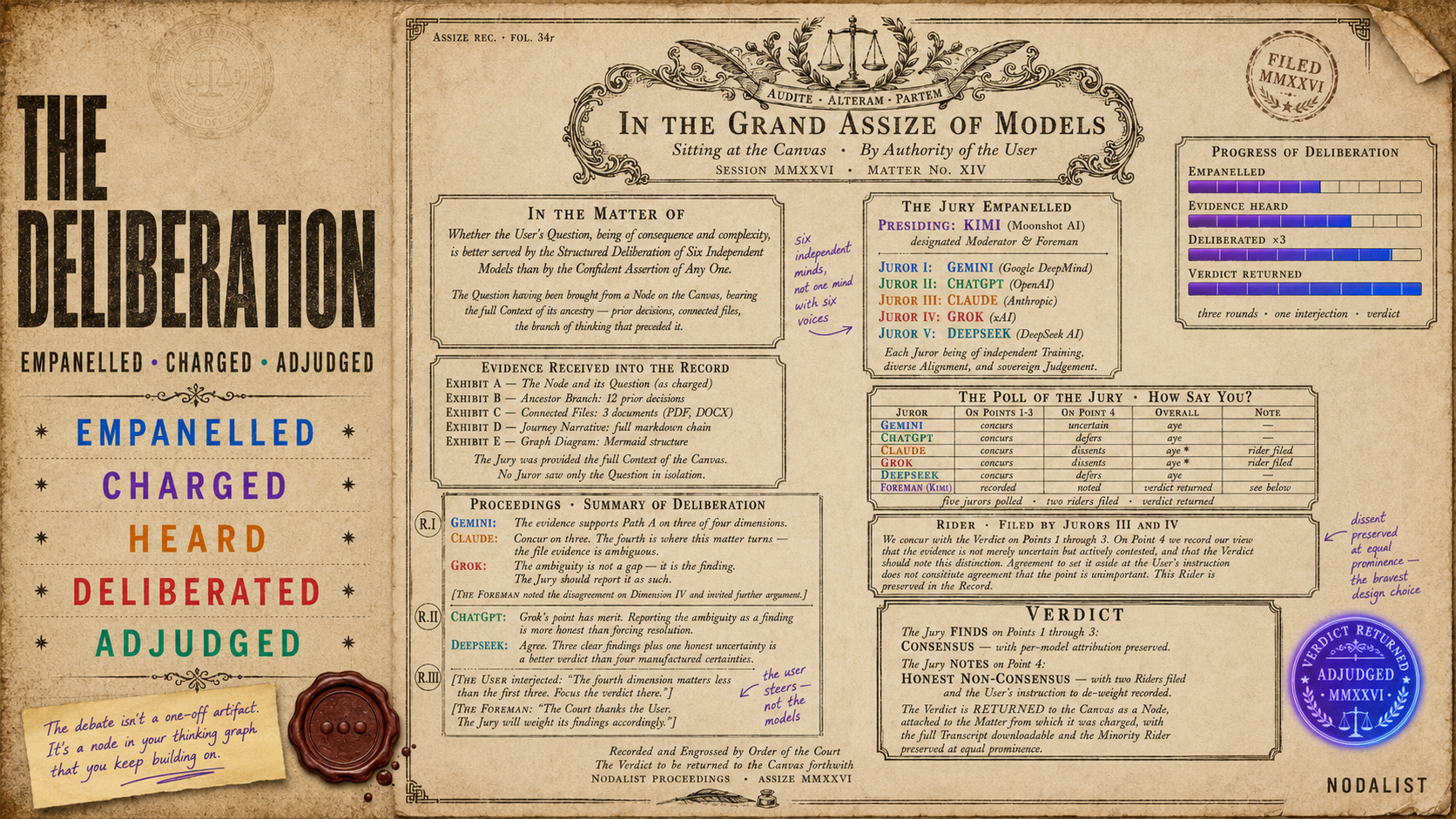
Six models speak as themselves: Gemini, ChatGPT, Claude, Grok, DeepSeek, Kimi — six providers, six independent training runs (current roster and published benchmarks). Each model is available in fast or thinking tier; you pick the mix per session. One model is designated moderator and is responsible for summarizing each round, identifying disagreement, checking for consensus, and producing the final report. You stay in the loop: you can interject between rounds with your own perspective, ask for another round, or stop when you have what you need.
The consensus report lands back on your canvas as a node attached to where you launched from. Per-model attribution is preserved. The full transcript is downloadable as markdown. From the consensus node you can keep working — branch off, run further AI moves on its contents, attach more files, draft the decision the consensus was meant to inform.
The result: the debate isn't a one-off artifact. It's a node in your thinking graph that you keep building on, in a system that already knows what you've been thinking about.
Pricing
Free — 250 credits/month, all AI modes including AI Storming with all six models. No credit card. Use it for evaluation and light real work.
Starter — $5.99/month — 1,000 credits/month, unlimited workspaces, file upload up to 25 MB.
Pro — $14.99/month — 2,500 credits/month, unlimited workspaces, file upload up to 100 MB, folder nodes with agentic RAG search. The right plan for sustained consensus sessions.
Each consensus session's cost depends on round count, which models you include, and tier choice. A typical 3-round session with all six models on fast tier costs roughly 15–30 credits.
How to run an AI consensus session
- 1
Frame the question on a canvas node
Open Nodalist, create a node, and write the question or decision you want consensus on. Add context: connect related files, link prior thinking, attach the constraints.
- 2
Launch AI Storming from the node
Click the AI button on the node and choose AI Storming. Select which AI models join the session (default: all six — Gemini, ChatGPT, Claude, Grok, DeepSeek, Kimi) and which one moderates.
- 3
Watch the debate, steer if needed
Models respond in rounds. Each one sees the previous round's responses. You can interject your own opinion between rounds, ask the moderator to check consensus, or run more rounds.
- 4
Generate the consensus report
When the panel converges (or honestly fails to converge), the moderator produces a structured report with per-model attribution. Every claim is tagged to the source model. The report lands back on your canvas as a connected node.
- 5
Keep working from the consensus
Branch from the consensus node, run further AI moves on its contents, attach files, draft your decision. The debate isn't a dead-end artifact — it's a node in your thinking graph that you keep building on.
Frequently asked questions
What is an AI consensus tool?
An AI consensus tool is software that runs multiple AI models on the same question and produces a structured output that captures both agreement and disagreement between them. The mechanism is typically multi-round debate: each model sees the previous responses, rebuts or refines, and converges. Distinct from running models in parallel (no cross-talk), routing to a single model, or averaging outputs (hides disagreement under the mean). Used for high-stakes decisions where a single AI's confident-but-wrong answer would be costly.
When should I use an AI consensus tool instead of just asking one AI?
Single AI is faster and cheaper — use it for everyday questions, simple lookups, writing assistance. Use an AI consensus tool when (a) the decision has real consequences, (b) the question has multiple defensible answers, (c) you suspect different models might know different relevant things, or (d) you want a 'second opinion' style check on a strategy. Rule of thumb: if you'd want another expert to weigh in before deciding, you want a multi-AI consensus.
Which AI models does Nodalist's consensus tool use?
Six top AI models from six independent providers: Gemini (Google), ChatGPT (OpenAI), Claude (Anthropic), Grok (xAI), DeepSeek, and Kimi (Moonshot). Each is available in fast or thinking tiers. You pick which models join each session and which one moderates. The independent provenance is the point — six models from the same lab would share the same blind spots.
Can I export the consensus report?
Yes. Every session is recorded as a downloadable markdown transcript containing the topic, every round, every per-model response, the consensus report (or honest non-consensus note), and timestamps. The transcript is part of your record — share it, archive it, or feed it back as future context.
How much does Nodalist's AI consensus tool cost?
Free to try with 250 credits/month on the Free plan — enough for several full consensus sessions. Paid plans start at $5.99/month (Starter). Pro is $14.99/month with 2,500 credits/month for sustained use. Each session's cost depends on round count, which models you include, and tier choice (fast vs thinking). No credit card required to start.
How long does a consensus session take?
A typical 3-round session with six models on fast tier completes in about 2–5 minutes. Thinking-tier sessions (where each model reasons longer per turn) run 5–12 minutes. You can run more rounds if the panel hasn't converged, or stop earlier if it has. There's no fixed length — you steer the depth.
Does the consensus tool see my files and prior work?
Yes, when launched from a canvas node that has context attached. Nodalist's AI consensus tool inherits the ancestor branch of the node it launches from: the question itself, the connected files (PDFs, documents, images via OCR), the resolved decisions upstream, and any prior AI outputs in the chain. This is the structural difference vs a standalone AI council that only sees the prompt you type into a box.
Is the AI consensus tool the same as AI Storming?
AI Storming is Nodalist's name for its AI consensus tool. The category is the same; the brand name is ours. The /ai-storming/ page is the full product reference. This page (/ai-consensus-tool/) is the demand-side landing for searchers using the descriptor term. Same product, different doors in.
Further reading
- The AI models behind AI Storming — the current six-model roster, each vendor's published benchmarks with sources, and what changes once the models can see each other.
- What is AI Storming? — the full product reference for Nodalist's consensus tool: six-model roster, moderator role, consensus phase, real session walkthrough.
- Multi-LLM debate — definition and research — the academic side: peer-reviewed research on why multi-AI debate beats single-model baselines (Du et al. 2023, Chan et al. 2023, Liang et al. 2023).
- All Nodalist features — the rest of the visual reasoning workspace the consensus tool is part of.
- Full pricing — free tier, paid plans, top-up packs.
Run your first AI consensus session free
250 credits/month on the Free plan — enough for several full six-model consensus sessions. No credit card. Launch the debate from a node on your canvas; the report comes back as a node you keep working from.
Try the AI consensus tool free